
Your booking calendar is filling up and the front desk is busy, but once you account for commissions and promotions, you’ve made less from a good month than you expected. Then a guest calls to ask why they found a cheaper room on a booking site than on your website. Somewhere between calls, you still need to set rates for the long weekend.
On our channel, Piotr Zioło, Director of Data Science at GuestSage, explains how to handle situations like these. He looks at three challenges you may know well from your own property: diversifying your sales channels, building relationships with guests and setting rates when demand takes you by surprise. He also shows how technology can help with the decisions you make every day. Watch the video! 🙂
In this article, we go a step further. We’ll look at what bookings cost, why rates differ and how to use automation to make decisions that work for your property.
1. The cost of acquiring a guest
Online travel agencies (OTAs) can bring you a guest who has never even heard of your hotel. They make it easier for you to reach international markets and for travellers to compare offers. You pay a commission to reach those guests. So it’s worth looking at how much of your business comes through intermediaries and how much the hotel keeps from each booking.
Start with your channel mix
As Piotr Zioło points out, at some hotels as many as 85% of online bookings come through OTAs. That shows how heavily a hotel can depend on intermediaries, although the mix varies from one property to the next.
Online bookings alone only tell part of the story. Booking sites may dominate your online sales even as guests regularly call the front desk to book. Before you take action, distinguish online bookings from total sales. Also check whether you’re counting bookings, room nights sold or revenue. Each measure tells a slightly different story.
Look at individual booking sites, too. If most of your new guests come from one site, a change in your property’s visibility there can have a significant impact on your results. Having your own website and a base of returning guests gives you more options.
Strengthen your direct sales
Commission is only the first cost to consider
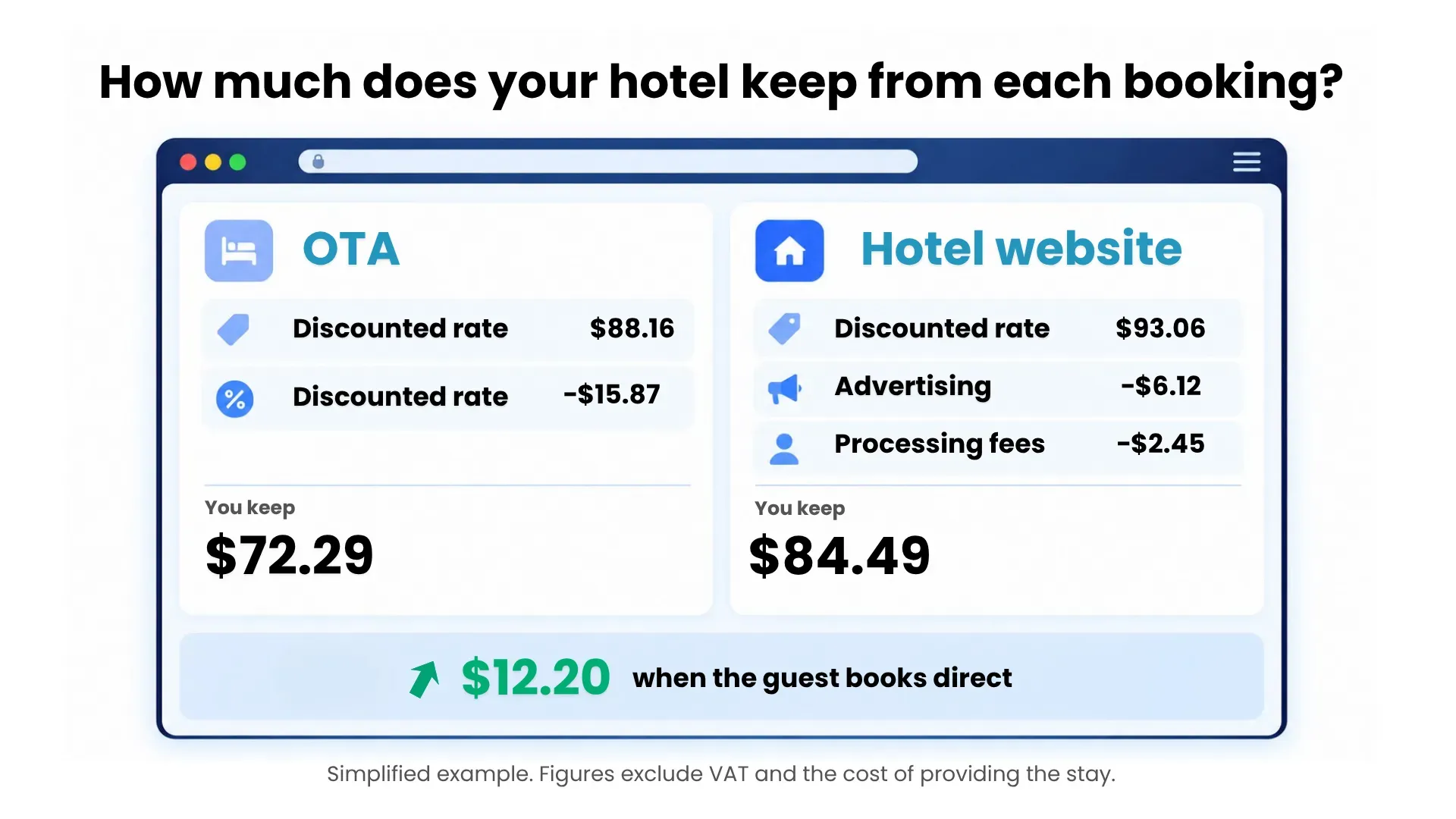
Imagine a simplified example that excludes taxes and the cost of providing the stay. All amounts are in US dollars. The starting room rate is $97.96. The hotel offers a 10% discount, bringing the rate to $88.16. The online travel agency (OTA) charges an 18% commission on that discounted rate. The guest pays $88.16, the OTA takes $15.87, and the hotel keeps $72.29 before other costs.
Now consider a direct booking. The guest pays a discounted rate of $93.06. Advertising costs $6.12 for this booking, and processing fees total $2.45. The hotel keeps $84.49, or $12.20 more than it would through the OTA. Comparing what you keep after selling costs gives you a clearer picture of how each channel performs.
If advertising for that same direct booking cost $22.04 instead of $6.12, the hotel would keep $68.57, and the OTA booking would bring in more. That’s why it’s worth tracking the full cost of selling through your own website. Include advertising, technology and payment processing, and count subscription fees only once if you’ve already allocated them across bookings.
In practice, you can start with room revenue after discounts, subtract distribution costs and divide the result by the number of room nights sold. Defining your net average daily rate (Net ADR) this way makes it easier to compare channels. Write down your definition and apply it consistently. You still have to account for other costs to arrive at the hotel’s profit. You still need to cover housekeeping, energy and staff costs, among other expenses.
Include cancellations, length of stay and spending on extras in your comparison. A channel that brings in longer stays and fewer cancellations may be more attractive than the room rate alone suggests. Use stay dates that have already passed so you avoid comparing confirmed arrivals with bookings that could still be cancelled.
2. A direct relationship with a guest starts with an offer they can trust
A guest has found your hotel, looked through the photos and visited your website. This is a good moment to make their decision easier. If they see a higher rate or can’t tell what’s included, they have a reason to return to the booking site. A “best rate” label alone won’t help much here.
Why rates can differ
The rate your hotel system sends out can differ from the price a guest sees on their screen. Mobile-only promotions or discounts for signed-in users can come into play along the way.
Before lowering your own rate, check that you’re comparing like for like:
- The same room, dates and number of guests.
- The same meal plan and cancellation terms.
- The total price, the device used and whether the guest is signed in.
A non-refundable rate without breakfast can look more attractive than a flexible package, even though the two meet different needs.
Look at the offer through your guest’s eyes
Start by choosing a few dates that matter for sales: the coming weekend, a holiday and a period of lower demand. Compare offers for those dates across your main channels. When you find a discrepancy, make a note of what caused it. That way you can adjust specific promotions and settings without having to lower rates across the board.
A good offer helps guests choose their stay
Parking included in the rate, more flexible date changes or the option of a late checkout can persuade a guest to book on your website. They should be able to see right away what they get and on what terms. Before adding a benefit to an offer, check its cost and availability so your front desk can deliver what you promised at the time of booking.
Just as much depends on how well the offer meets the guest’s needs. A family planning a holiday will look for different things than someone travelling on business. Someone with flexible dates may be happy to arrive two days later if they see an appealing option straight away. Having to search again and again, on the other hand, can quickly put them off booking.
In the video, we illustrate this problem using GuestSage’s Offer Recommender. It helps match guests with offers and suggests alternatives when their chosen dates or length of stay don’t fit the hotel’s availability or booking restrictions. If there’s a seven-night minimum, someone searching for five nights should see a clear explanation and an offer for a longer stay, with the total price clearly displayed.
Use completed bookings to assess how well a tool like this works. More clicks on recommendations may indicate interest, but conversion, booking value and the amount left after costs show what the hotel actually gains. If your website gets enough traffic for an A/B test, run versions with and without recommendations at the same time. With a small sample, allow more time before drawing conclusions.
Personalisation depends on trust
When building a guest profile, it’s tempting to collect everything just in case. The GDPR, however, requires a specific purpose, transparency, collection limited to the data you need and an appropriate retention period. Start with the information you actually need for the feature in question. The guest’s preferred dates and party size may be enough to suggest an alternative stay.
Be clear about which data you use, your legal basis for using it and who you share it with. A previous booking does not automatically give you consent for further marketing. Guests should understand why they’re receiving a particular offer and see how it benefits them. Keep that in mind when choosing technology, too.
3. Pricing takes more than tracking occupancy
Selling 70% of your rooms may be encouraging, but occupancy alone won’t tell you what rate to set. The picture looks different if guests arrive tomorrow than it does three months before arrival. It also matters whether the rooms filled up gradually or one large group booked most of them.
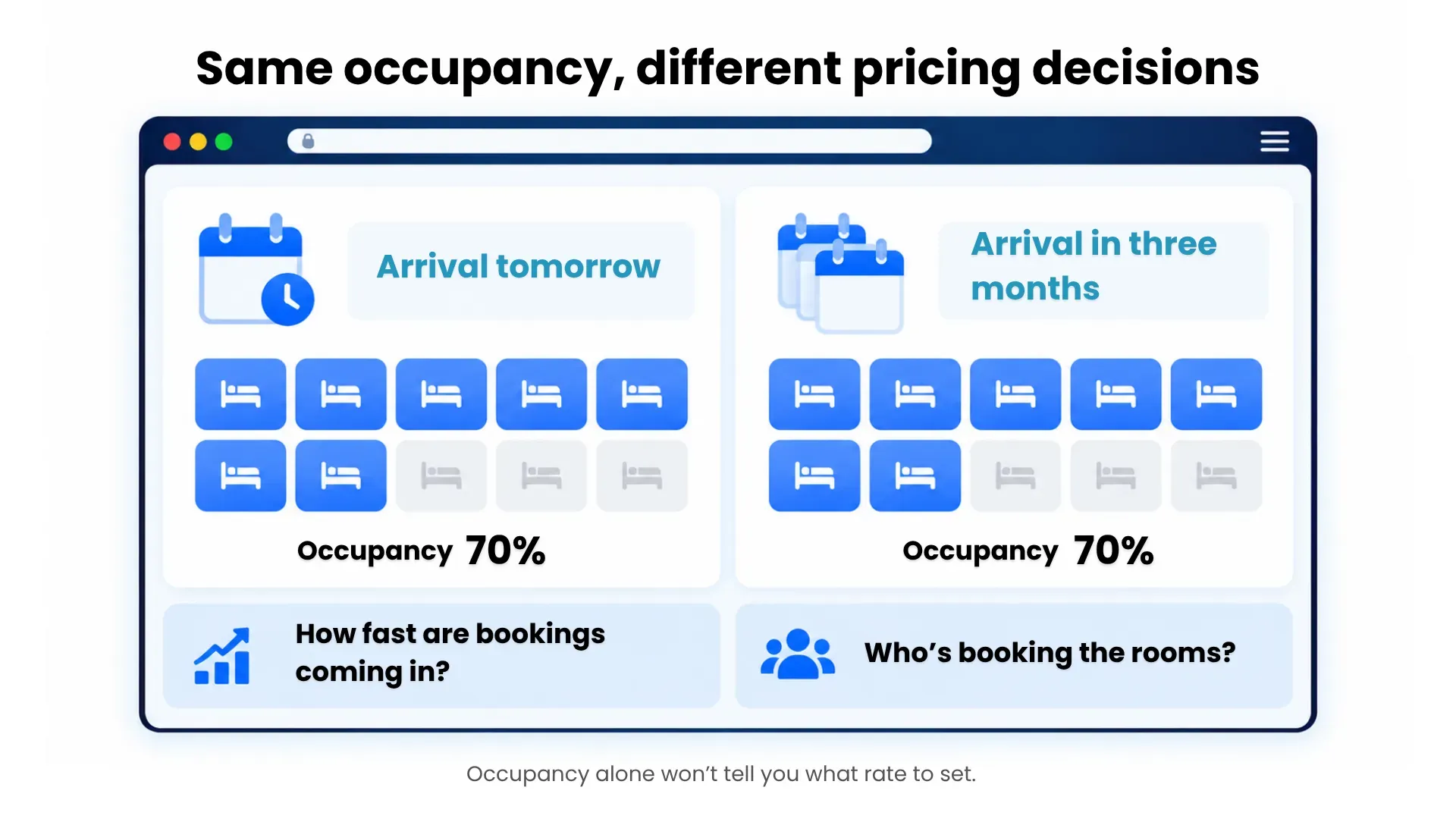
Check how fast bookings are coming in and where they come from
In the video, we use the example of a wedding party that books most of the property. You have fewer rooms left to sell, but taking that group booking doesn’t prove that the destination has suddenly become more popular with travellers in general. Lower availability still matters when you set rates. You just need to distinguish it from a change in market demand.
Look at how many bookings you’ve gained in recent days (your booking pickup), how much time is left before arrival and how many cancellations you’ve had. Compare similar days of the week at the same point in the booking window. If a holiday fell on a different date last year, comparing calendar dates alone can be misleading. This analysis helps you tell whether a particular weekend really is selling more slowly or whether guests usually book it later.
A local event is a reason to check demand
A major concert can keep hotel front desks busy, too. According to preliminary CoStar data, on 17 August 2024, during Taylor Swift’s London shows, hotel occupancy reached 94% and the average room rate was £239.01. Both figures were the highest recorded that month. It’s a good example of the impact events can have, though you’ll need to consider your local market to assess what an event means for your hotel.
When an event is announced, consider who will attend and how many people are likely to look for accommodation near your hotel. A local fair will draw a different crowd from an international trade show. Plan your rates, then monitor bookings and adjust your prices. Look at the days before and after the event, too, as some guests may stay longer.
Rules and AI help in different ways
A simple rule such as “raise the rate when occupancy exceeds 70%” is easy to understand and monitor. You do, however, need to set the thresholds yourself and check that they still make sense for your hotel. A model that learns from data can account for more relationships and update its forecasts. Research on forecasting hotel demand describes this approach, in which the model continually learns how the market behaves.
Monitoring the market and updating rates every day can take up a good part of your day. GuestSage’s Price Recommender can help by analysing booking history, guest segments, sales channels and forecast demand. It uses that information to set rates within the limits you choose.
Automation you control
Before you start, check that your data is complete, group bookings are correctly identified and channel costs are accurate. Set rate limits and decide how you’ll respond to unusual recommendations. If your property is new, ask the provider what it bases its forecasts on when booking history is limited. Someone should also be responsible for regularly reviewing results and handling exceptions, such as the cancellation of a major event.
It’s also worth taking a close look at the results after implementation. Higher revenue is welcome, but a strong season may account for some of the increase. Compare similar periods, taking demand and costs into account. Also check how much time your team now spends managing rates so you can assess the benefits of automation more fully.
Where to start at your hotel
Start by checking three things at your property:
- Choose a month that has already ended and calculate how much each of your main channels brought in after distribution costs.
- Go through your own booking process on a phone, from searching for a room to making a payment. Check whether the price, terms and benefits are clear.
- Look at a few upcoming dates for which bookings are coming in faster or more slowly than expected.
These three steps will show you where you have the most room for improvement. You may need to tidy up your discounts, make offers easier to browse or get support with day-to-day pricing. Then it’s easier to choose a tool for a specific task and assess its impact later.
In the meantime, if you haven’t seen our video yet, give it a watch. 🙂 And if you’d like to find out how to manage rates more effectively at your property, talk to our experts. We’ll be happy to help you find a solution that fits your hotel’s needs.